Languages and versions
Every language and version you can select for Git-based services on seenode.
Last updated September 18, 2026
When you create a static site, web, worker, or private service from Git, seenode builds your code in a container that already has a language toolchain installed. That choice is labeled Language in the dashboard.
The language supplies the compiler or interpreter (Node, Python, Go, or Elixir). Your build command still installs app dependencies on top of it (npm install, pip install, go build, and so on).

How language is chosen
- seenode inspects the repository’s language breakdown from GitHub or GitLab.
- It picks a matching language and a current default version (for example Node for JavaScript/TypeScript, Python for Python).
- You can change both the language and the version in the Language dropdown before you create the service.
- After create, change it anytime under the service’s Settings → Language. The next deploy rebuilds with the new toolchain.
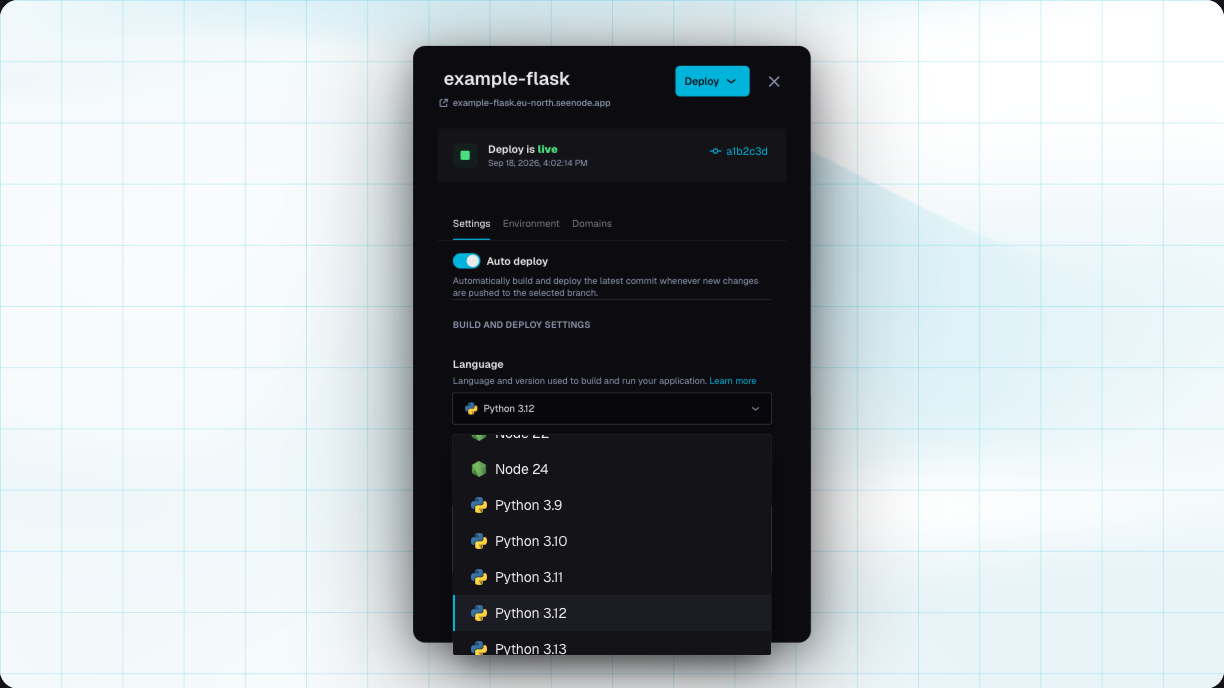
If the repo language is unclear, static sites default to Node 22. Web, worker, and private services fall back to the first available language image.
Available languages
Versions below match what the platform exposes today in the Language picker.
| Language | Versions | Typical use |
|---|---|---|
| Node.js | 16, 18, 19, 20, 21, 22, 24 | Express, Nest, Next.js (Node server), Vite/SPA builds, static site builds |
| Python | 3.9, 3.10, 3.11, 3.12, 3.13, 3.14 | Django, FastAPI, Flask, Celery workers |
| Go | 1.21, 1.24 | Compiled HTTP APIs and workers (go build) |
| Elixir | 1.18 | Phoenix and other BEAM apps |
UI labels use short names such as Node 22, Python 3.12, Golang 1.24, and Elixir 1.18.
Node.js
Ships with npm. Default suggestions on create are usually npm install && npm run build for build and npm run start -- -p 80 for start. Prefer an LTS line (20 or 22) unless you need a newer feature on 24.
Node is also the build language for static sites: the site is built in the Node container, then only the publish directory is served.
Python
Ships with pip. Default suggestions are pip install -r requirements.txt and python app.py. For production HTTP, set a start command that binds 0.0.0.0 on your service port (for example Gunicorn or Uvicorn). See the Python guides.
Go
Ships with the Go toolchain. Defaults compile with go build -v -o app main.go and run ./app. Point root directory / build paths at your real main package if it is not at the repo root.
Elixir
Ships with Elixir 1.18 and a modern OTP (needed for TLS helpers such as cacerts_get/0). Prefill build and start from your mix release workflow; see Phoenix and OTP CA certs.
What Language does not cover
- Docker image services skip the Language picker. The image you pull already defines the runtime.
- System packages beyond the language (OS libraries, a second toolchain) are not preinstalled. Install them in the build command when needed — for example Node inside a Python build.
- Databases are separate managed services, not language images. See Databases.
Tip (Need two languages in one build?)
Pick the primary language for the service, then install the second toolchain in your build command. A common pattern is a Python API that also runs npm to build a frontend — see Installing Node.js in a Python image.
Changing language later
Open the service → Settings → Language. Pick another language or version, save, and Deploy. seenode rebuilds from the selected Git commit with the new image. Build and start commands are not rewritten automatically — update them if the new language expects different commands.
Related
Your first deploy
Create a static site or web service and pick a language along the way.Web services
How the language container builds and starts your HTTP app.Framework guides
Django, FastAPI, Express, Next.js, Go, Phoenix, and more.System packages
Install Node (or other tools) inside a Python build.