Deploy FastAPI App on Seenode | FastAPI Hosting & Deployment Guide
Deploy your FastAPI app on Seenode with a simple setup. Follow our quickstart guide to configure, connect Git, and go live in minutes.
This guide will walk you through deploying your existing FastAPI application on seenode using Uvicorn as the ASGI server.
Prerequisites
Before you begin, ensure you have:
- A seenode account at cloud.seenode.com
- Git configured on your machine
- Existing FastAPI project ready to deploy
Configure for seenode Deployment
Application Structure
Ensure your project has a main.py file and a requirements.txt. seenode will look for an app instance in your main.py file.
from fastapi import FastAPI
app = FastAPI()
@app.get("/")def read_root(): return {"message": "Hello from FastAPI"}Requirements
Your requirements.txt should include fastapi and an ASGI server like uvicorn for production:
fastapiuvicorn[standard]Deploy on seenode
Push to Git
Commit your project and push it to GitHub or GitLab.
Create a Web Service
From the seenode Dashboard, create a new Web Service and connect the Git repository for your FastAPI application.
Configure Build & Start
seenode automatically detects a Python project. Configure:
- Build Command:
pip install -r requirements.txt - Start Command:
uvicorn main:app --host 0.0.0.0 --port 80
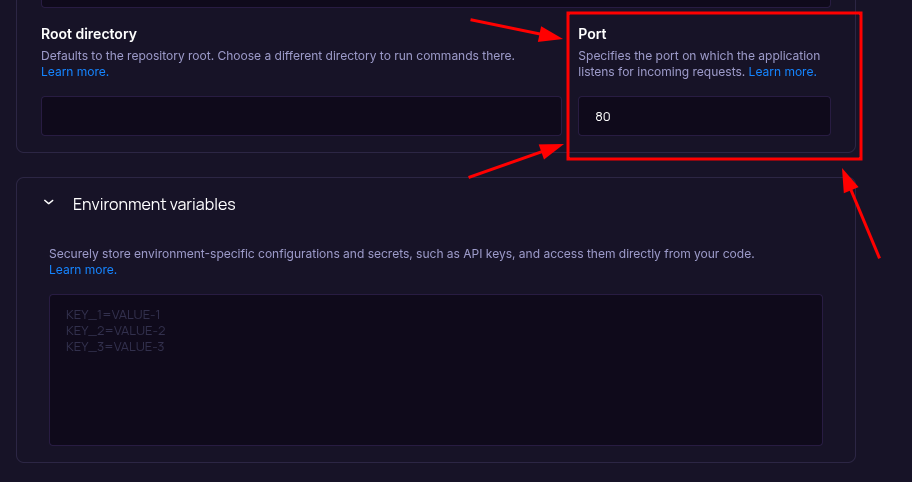
The Port field starts empty, so you should set it during setup to the value your app uses (for example,
80). Ensure your application binds to the same port (for example,--port 80). Do not rely on aPORTenvironment variable; seenode routes using the configured Port input.- Build Command:
Choose Pricing Tier
Select your preferred instance size and click Create Web Service.
Deploy
Click Create Web Service and watch logs until your web service is live.
Success
Once complete, your API is live and accessible at your service’s public URL.
::::tip[Troubleshooting] If your deployment fails, the first place to check is the Logs tab in your seenode service dashboard. Build and runtime logs often contain valuable information for diagnosing issues.
Port configuration mismatch
- There is no default port. Ensure your application listens on the port you set in the Configure Build & Start screen.
- Adjust in framework config if needed (for example, modify your
uvicornstart command or how your app reads the port). - Seeing a 502 Bad Gateway? This often means your app is not listening on the configured port. ::::
Starting from Scratch?
If you don’t have a FastAPI project yet:
Option 1: Use our Template (Recommended)
FastAPI Template
Deploy a minimal FastAPI application designed for zero-configuration deployment on **seenode**.Option 2: Create from FastAPI Docs + seenode Setup
Follow the official FastAPI documentation to create a new project, then return here for seenode-specific deployment steps.
seenode-Specific Setup Steps:
- Create
main.pywith FastAPI app - Add
requirements.txtwith FastAPI and Uvicorn - No additional configuration needed
Next Steps
Now that your API is live, here are some recommended next steps:
Set up a Custom Domain (Coming Soon)
Configure a custom domain to point to your new web service.Connect to a Database
Instantly scaffold and connect PostgreSQL and MySQL databases