Creating a MySQL Database
Learn how to create, connect to, and scale a managed MySQL database on seenode.
This guide walks you through creating a managed MySQL database on seenode, connecting your app to it, and choosing an instance size.
-
Go to the Database tab
From your seenode dashboard, select Database in the sidebar.
-
Start the creation process
Click Create database.
-
Enter the database details
Fill in the form and click Create database:
- Name: a unique name for your database (one is suggested for you).
- Type: select MySQL.
- Database version: 8.4 (the currently available MySQL version).
-
Your database is ready
seenode provisions the database and it is running within seconds. There is no separate instance-tier step; every database starts on the Basic instance and you can upgrade later (see Instances and pricing below).
From the database dashboard you can view the connection details, monitor storage and active connections, change the password, upgrade the instance, and assign the database to a project.
Connecting to your database
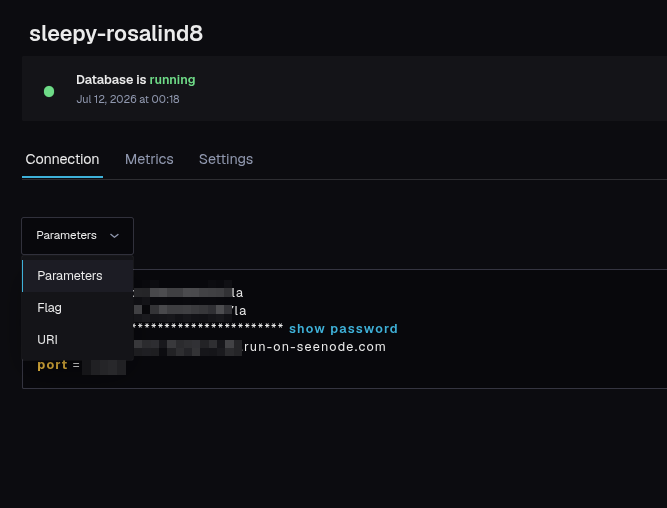
Open the Connection tab to see everything your application needs:
- host, port, database, username, and password.
Use the format selector to copy the details as plain parameters (key/value), as CLI flags, or as a ready-to-use URI connection string. Click show password to reveal the password, or Change password to rotate it.
Services running in the same workspace can reach the database over seenode’s private network; you can also connect over the public network from outside seenode.
Instances and pricing
New databases start on the Basic instance. You can change the instance size at any time from the database’s Settings → Upgrade instance. Billing is credit-based and deducted daily from your workspace balance.
| Instance | Storage | Connections | Backups | Price |
|---|---|---|---|---|
| Basic | 1 GB | 10 | None | $4/mo |
| Standard | 5 GB | 15 | 7-day | $12/mo |
| Pro | 20 GB | 25 | 14-day | $30/mo |
| Ultra | 50 GB | 50 | 30-day | $75/mo |