
Most Python hosting comparisons rank providers by their cheapest compute tier and call it a day. That is almost useless once you deploy a real app.
A Django project that runs migrations on deploy and serves static files has very different needs from a FastAPI service holding open WebSockets, or a Flask API handing jobs off to Celery. The $5/month headline price on a landing page rarely includes PostgreSQL, a background worker, persistent disk, or outbound bandwidth. Add those in, and a “cheap” host can easily run $25 to $45 a month.
We checked the official pricing and documentation of seven Python hosts on 17 November 2026 and priced them across three real setups: an idle prototype, an always-on API with PostgreSQL, and a web app with PostgreSQL plus a background worker.
Quick answer
Seenode is the best pick for most small production Python apps in 2026 because an always-on web service ($4/month) and a managed PostgreSQL database with daily backups ($4/month) cost a flat $8/month total, with a 7-day free trial and no surprise traffic charges. Render is the best choice if you want a free sandbox tier for testing, preview environments, and render.yaml blueprints, with paid web services from $7/month. PythonAnywhere is the easiest starting point for beginners deploying a first WSGI Django or Flask project from the browser (free plan available, or $10/month with bundled MySQL). Railway fits spiky, multi-service backends that benefit from per-second billing ($5/month Hobby minimum), and Fly.io is the cheapest way to run a tiny standalone Python container 24/7 ($2.19/month for 256 MB RAM) when you do not need managed Postgres.
Quick comparison: which platform fits your app?
| Platform | Best for | Free tier or trial | Starting paid price | Standout |
|---|---|---|---|---|
| Seenode | Predictable always-on apps + database | 7-day free trial (no card) | $4/mo (512 MB app), $4/mo Postgres | Fixed monthly bill with no bandwidth or request charges |
| Render | Full-featured Git deploys and teams | Free tier (sleeps; DB expires in 30d) | $7/mo (512 MB app), $6.30/mo Postgres | Separate web, worker, cron, and preview environments |
| Railway | Multi-service apps with variable traffic | 30-day $5 trial, then $1/mo credit | $5/mo Hobby (includes $5 usage) | Per-second CPU and RAM billing with zero-config Railpack builds |
| PythonAnywhere | Beginners and WSGI Django or Flask | Free Beginner plan (1 app) | $10/mo Developer (includes MySQL) | Browser IDE and consoles with zero server or Docker setup |
| Fly.io | Docker-native global microVMs | 7-day $1 trial | $2.19/mo (256 MB Machine) | 30+ regions and cheap standalone compute ($38/mo for Managed Postgres) |
| Heroku | Existing Procfile and Salesforce teams | No free tier | $5/mo Eco (sleeps), $7/mo Basic | Classic git push heroku main workflow and add-on marketplace |
| DigitalOcean App Platform | Teams already in the DigitalOcean cloud | Free for static sites only (up to 3) | $5/mo (512 MiB app), $15.15/mo prod Postgres | 50 GiB+ bundled bandwidth per container and DO VPC integration |
Take the word “free” in that table with a grain of salt. Render’s free web service sleeps after 15 minutes of silence, and its free PostgreSQL database self-destructs after 30 days. PythonAnywhere’s free tier stays awake on a subdomain, which is great for a class project, but it blocks outbound HTTP calls outside an allowlist and omits scheduled tasks. Use free tiers to test a workflow, not to run production.
What to look for in Python hosting
Before you look at pricing tables, check how a host handles the six things that usually break a Python deployment:
- Django and Flask run as synchronous WSGI apps behind Gunicorn, while FastAPI (and async Django) needs an ASGI server like Uvicorn. That split still trips people up on PythonAnywhere, where WSGI is standard and ASGI is an experimental CLI feature. Also verify you can pin your Python version with
.python-versionorruntime.txt. - Pushing to GitHub or GitLab and letting the platform run build and start commands works for most projects. When a package needs
ffmpeg,libpq-dev, or another OS library, you wantDockerfilesupport. - Free plans and Heroku’s $5 Eco dyno spin down after 15 to 30 minutes without traffic. The first visitor waits up to a minute for Python to boot, active WebSockets drop, and in-process background tasks die quietly.
- Managed PostgreSQL ranges from $4/month on Seenode to $38/month on Fly.io for an entry instance. Check connection limits, daily backups, and whether database queries travel over a free private network instead of counting as public internet egress.
- Container filesystems reset on every deploy. If your app saves user uploads to a local folder instead of S3-compatible object storage, those files vanish on your next git push unless you mount a persistent volume ($0.15 to $0.50/GB/month).
- A Celery worker runs 24/7, while a cron job runs on a schedule and exits. Make sure your host knows the difference so it does not treat an exiting cron script as a crashed worker and restart it in a loop. Also compare log retention (3 to 30 days), regions, and manual vs. automatic scaling.
Seven Python hosting platforms compared
Every host below is judged on the same points: workloads, deployment flow, list prices (checked 17 November 2026), strengths, trade-offs, and when to pick it.
1. Seenode
Seenode is built for the most common small-team setup: an always-on Django, Flask, or FastAPI app, a background worker or private internal service, and a managed PostgreSQL or MySQL database in one workspace (service docs). Connect GitHub, GitLab, or a Docker image, set your build command, start command, and port (80 by default), and deploy with live logs and rollbacks in the dashboard.
The draw on Seenode’s pricing page is that your bill does not move when traffic spikes. Web, worker, and private services start at $4/month (0.5 GB RAM, 0.2 vCPU) and $7/month (1 GB RAM, 0.5 vCPU), deducted daily from non-expiring credits. Managed PostgreSQL or MySQL is also $4/month for 1 GB disk, 20 connections, and seven daily backups; volumes cost $0.50/GB/month and static sites are $0 (Beta), with a seven-day cardless trial. Because bandwidth and request counts never change the package price, a crawler or a bad retry loop will not turn into a surprise invoice. All workloads currently run in Frankfurt, and scaling is manual: you pick a larger plan or add replicas yourself rather than relying on traffic autoscaling.
Pros: Fixed monthly pricing with zero bandwidth overages, always-on processes with no cold starts, $4/month managed Postgres and MySQL with daily backups included, and EU hosting in Frankfurt.
Cons: Single region (Frankfurt), manual replica scaling instead of traffic-based autoscaling, and no permanent free tier for Python apps after the 7-day trial.
Pick this if: You want an always-on Django, Flask, or FastAPI app with a database and worker under one roof, and you want to know your exact monthly bill before traffic arrives.
2. Render
If you want a classic full-featured PaaS with preview environments, render.yaml blueprints, cron jobs, and autoscaling on higher tiers, Render is the safest default in this group. Connect a Git repo or Dockerfile, set pip install -r requirements.txt and your Gunicorn or Uvicorn command bound to $PORT (Python docs), and deploy to US, EU, or APAC regions.
On Render’s pricing page, the Hobby workspace is $0/month (5 GB bandwidth, 500 build minutes) and Pro is $25/month. Paid web services and workers start at $7/month (512 MB RAM, 0.5 CPU). Paid Postgres starts at $6/month (256 MB RAM) plus $0.30/GB for disk, with three days of point-in-time recovery on Hobby. Free web services sleep after 15 minutes (~1 minute wake time), and free Postgres expires after 30 days. Bandwidth beyond 5 GB on Hobby is $0.15/GB, and attaching a disk ($0.25/GB/month) disables zero-downtime deploys.
Pros: Clean Git deploys, render.yaml infrastructure-as-code blueprints, dedicated cron and worker service types, point-in-time database recovery, and US/EU/APAC regions.
Cons: Free web apps sleep after 15 minutes and free Postgres databases are deleted after 30 days. Costs stack up once you combine a web app, worker, database, Pro workspace seats, and bandwidth overages ($0.15/GB).
Pick this if: You want a free sandbox to test a prototype, or your team needs preview environments, blueprints, and multi-region options.
3. Railway
Railway is the fastest way I know to wire together a multi-service Python app. When a project has a FastAPI backend, a Celery worker, a cron job, Postgres, and Redis, Railway’s visual canvas and CLI (railway up) make linking them effortless. Railpack detects Python dependencies automatically, or you can use a Dockerfile or railway.toml.
Instead of fixed tiers, Railway’s pricing bills by the second for RAM ($10/GB/month) and active CPU ($20/vCPU/month), plus $0.15/GB/month for volumes and $0.05/GB for egress. After a $5, 30-day trial, plans are Free ($1/month credit), Hobby ($5/month, includes $5 usage), and Pro ($20/month, includes $20 usage). Paying for active CPU is great for bursty services, and stopped containers cost nothing. It is less comforting when a busy worker pushes usage up mid-month and you cannot predict the final invoice. The $1 Free credit cannot run a 0.5 GB Python app 24/7 (~$5/month for RAM alone), and database backups and HA are opt-in.
Pros: Fast visual project canvas for multi-service stacks, zero-config Railpack builds, per-second billing where idle CPU costs nothing, and one-click Postgres and Redis templates.
Cons: Monthly bills fluctuate with CPU load, memory, and outbound traffic ($0.05/GB). The $1/month Free credit is too small for a 24/7 Python process, and database backups/HA must be enabled manually.
Pick this if: You run several light or bursty Python services and want to pay for actual resource consumption rather than fixed container tiers.
4. PythonAnywhere
PythonAnywhere feels like a time capsule from an earlier web, and I mean that mostly as a compliment. There are no containers or YAML files: you open a browser Bash console, run git clone, create a virtualenv, edit a WSGI file in the Web tab, and click Reload (Django guide). For students, teachers, and simple Django or Flask sites, skipping all the cloud plumbing is a relief.
Per PythonAnywhere’s pricing, Beginner is $0/month for one subdomain app, 512 MB disk, and 100 CPU-seconds/day. Developer is $10/month for one custom-domain app, three workers, 5 GB disk, 20 scheduled tasks, one always-on task, SSH, and bundled MySQL (Custom plans add Postgres). Web apps never sleep, even on the free tier. The dealbreaker for modern stacks is WSGI: ASGI support for FastAPI is still beta, CLI-configured, and lacks static file mappings. There is no Docker support, no git-push deploy, and free accounts can only call allowlisted external domains.
Pros: Genuinely free Beginner plan that never sleeps, in-browser IDE and Bash consoles, and a flat $10/month Developer plan that bundles a web app, MySQL, 20 scheduled tasks, and an always-on task.
Cons: Built around WSGI; FastAPI (ASGI) support is still experimental and CLI-only. No Docker support, no automatic Git-push deploys, and free accounts block outbound HTTP requests outside an allowlist.
Pick this if: You are a beginner, student, or solo builder shipping a WSGI Django or Flask site and want a flat $0 or $10 bill with zero server setup.
5. Fly.io
Fly.io is for developers who like thinking in Dockerfiles, regions, and virtual machines. Run fly launch in a Python project, and Fly generates a Dockerfile and fly.toml (with web and worker process groups) and boots a Firecracker microVM in any of 30+ global regions.
On Fly.io’s pricing page, raw compute is a bargain: no platform fee, a $1 seven-day trial (personal bills under $5 are waived), and always-on shared-CPU Machines at $2.19/month (256 MB) or $3.69/month (512 MB), plus $0.15/GB/month for volumes and $0.02/GB for US/EU egress. Then you see the database price and do a double take. Fly Managed Postgres starts at $38/month (1 GB RAM, HA, backups) plus $0.28/GB disk. Paying $3.69 for your app and $38 for its database feels lopsided for a small project. You can run self-managed Postgres on a cheap Machine, but Fly marks that setup as unsupported: if replication breaks at 2 a.m., that is on you.
Pros: Lowest standalone always-on compute price ($2.19 to $3.69/month), 30+ global regions, fast Firecracker microVMs, and optional auto-stop/auto-start on traffic.
Cons: Steep jump from $3.69 app compute to $38/month for Managed Postgres (cheaper self-hosted Postgres on a Machine is officially unsupported). Steeper CLI and Dockerfile learning curve than GUI-first platforms.
Pick this if: You are comfortable with Docker and the command line, and you want cheap standalone Python compute or multi-region placement close to users.
6. Heroku
For years, Heroku was how almost every Python developer learned to deploy, and git push heroku main with a Procfile (web, worker, release) is still a pleasant workflow (Python support). On Heroku’s pricing page, there is no free tier: Eco dynos cost $5/month (0.5 GB RAM, sleeps after 30 minutes), always-on Basic dynos cost $7/month each, and Postgres Essential-0 is $5/month (1 GB disk, 20 connections, shared RAM).
Why hesitate on Heroku in 2026? It is the company direction, not the CLI. In February 2026, Heroku moved to a sustaining engineering model: security patches and runtime updates continue, and credit-card signups stay open, but new feature development is paused and new Enterprise contracts are closed. Add ephemeral dyno disks, up to four hours of monthly maintenance downtime on Essential-0 Postgres without point-in-time recovery, and $7 for each extra worker dyno, and it is tough to recommend for a brand-new project unless you are tied to Salesforce. See our Heroku alternatives guide if you are migrating.
Pros: Battle-tested Procfile and release-phase workflow, mature buildpacks, and a massive third-party add-on marketplace.
Cons: Transitioned to sustaining engineering in February 2026 (no new feature development and no new Enterprise contracts). No free tier, Eco dynos sleep, dynos have no persistent disk, and every worker adds another dyno fee.
Pick this if: Your team already runs on Heroku or relies on Salesforce integrations and specific Heroku add-ons.
7. DigitalOcean App Platform
If you already use DigitalOcean, App Platform is the low-drama way to run containers in the same account and VPC. Connect GitHub, GitLab, or a registry, and build from a Dockerfile or the Python buildpack (requirements.txt, Pipfile, or uv.lock). One quirk: pass --worker-tmp-dir /dev/shm to Gunicorn so worker heartbeats do not fail inside their container setup.
Per App Platform’s pricing, the free tier covers static sites only (up to three). Python containers start at $5/month (512 MiB RAM, 50 GiB transfer) or $12/month (1 GiB RAM, scalable). A 512 MB Dev Database is $7/month; production Managed PostgreSQL starts at $15.15/month (1 GiB RAM, 10 GiB disk). Bandwidth is generous and autoscaling works well, but App Platform’s limits exclude persistent block volumes completely. The 4 GiB local disk is wiped on every deploy, so user uploads must go to Spaces object storage.
Pros: Predictable container pricing from $5/month, 50 GiB+ bundled outbound bandwidth per container, CPU and request-based autoscaling, and seamless VPC networking with DigitalOcean Droplets and Spaces.
Cons: No persistent block volumes on App Platform containers (ephemeral 4 GiB disk resets on deploy), and production Managed PostgreSQL starts at $15.15/month.
Pick this if: You already use DigitalOcean Droplets, Spaces, or Managed Databases and want a zero-maintenance container PaaS inside the same cloud account.
What changes for Django, Flask, and FastAPI
Django: migrations, static files, and uploads
Run Django behind Gunicorn (gunicorn your_project.wsgi --bind 0.0.0.0:80) or Uvicorn for async views.
Watch where you run python manage.py migrate. Putting it in your build command works on a single container, but the build finishes before the new container passes its health check. If the new deploy crashes on boot, your old container is still running against a migrated database, so keep schema changes backward-compatible.
Static files and uploads are the next trap. Django does not serve static files when DEBUG=False, so run python manage.py collectstatic --no-input during the build and use whitenoise or a CDN. Put user uploads (MEDIA_ROOT) on a persistent volume or S3-compatible storage so redeploys do not wipe them.
Before your first push, set SECRET_KEY, DEBUG=False, DATABASE_URL, and ALLOWED_HOSTS via environment variables. Forgetting ALLOWED_HOSTS is the number-one cause of a first-deploy 400 Bad Request. See the Seenode Django guide, Django environment variables in production, and 10 common Django deployment mistakes.
Flask: a real WSGI server, not flask run
Never deploy flask run; Werkzeug’s development server is built for local debugging and chokes under concurrent traffic. Run Gunicorn instead:
gunicorn app:app --bind 0.0.0.0:80 --workers 2On a 512 MB container, two sync workers is a safe start without risking out-of-memory kills. Because those workers are separate OS processes, do not store sessions or rate-limit counters in a Python global dictionary; keep them in PostgreSQL, signed cookies, or Redis. See the Seenode Flask guide and our Flask on Heroku guide.
FastAPI: ASGI, WebSockets, and background jobs
FastAPI needs an ASGI server like Uvicorn (uvicorn main:app --host 0.0.0.0 --port 80), which rules out standard WSGI-only hosts.
For WebSockets, verify your host passes HTTP Upgrade headers and does not sleep idle containers. If you run two or more replicas, an in-memory connection list only sees clients on that one container, so use Redis pub/sub to broadcast across replicas. Also treat FastAPI’s built-in BackgroundTasks as expendable: it runs inside the web process after the response and vanishes if the container restarts during a deploy. Move retries and slow jobs to a separate worker. See the Seenode FastAPI guide, FastAPI with Docker and Uvicorn, and FastAPI WebSockets in production.
Compare the whole monthly bill
To see what these hosts cost past the landing page, we priced three setups in one region with 10 GB of monthly outbound traffic (USD list prices before tax, checked 17 November 2026):
- Prototype: one 0.5 GB web app, no managed database.
- Always-on app + PostgreSQL: one 0.5 GB web app running 24/7 (730 hours) plus the smallest non-expiring managed PostgreSQL (~1 GB disk).
- App + worker + PostgreSQL: setup 2 plus a separate 0.5 GB 24/7 background worker.
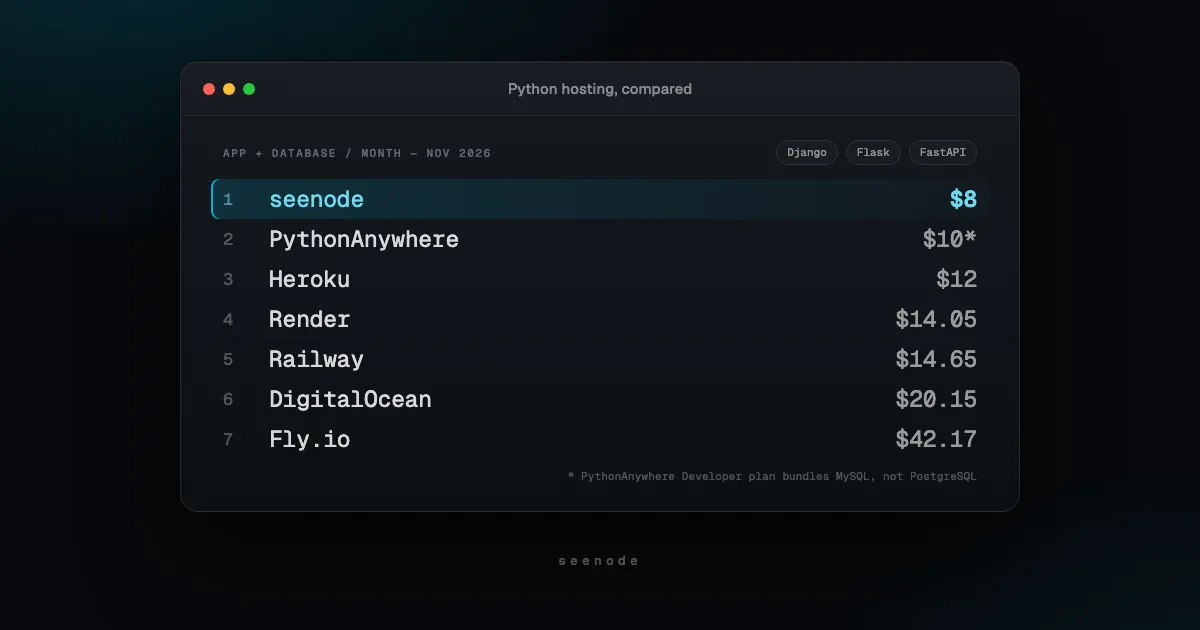
| Platform | Prototype | App + PostgreSQL | App + worker + PostgreSQL | Breakdown |
|---|---|---|---|---|
| Seenode | $4 (7d trial) | $8 | $12 | $4 web + $4 Postgres (1 GB, 7 backups) + $4 worker. |
| Render | $0 (sleeps) | $14.05 | $21.05 | $7 web + $6.30 Postgres (1 GB) + $7 worker + $0.75 egress. |
| Railway | ~$7 ($5 min) | ~$14.65 | ~$21.65 | Est. ~$7/service (0.5 GB RAM + 0.1 vCPU) + $0.15 volume + $0.50 egress. |
| PythonAnywhere | $0 (subdomain) | $10* | $10* | *$10 Developer plan bundles MySQL + 1 always-on task; Postgres costs extra. |
| Fly.io | ~$3.89 (waived under $5) | ~$42.17 | ~$45.86 | $3.69 Machine + $38.28 Managed Postgres (1 GB) + $0.20 egress + $3.69 worker. |
| Heroku | $5 (Eco, sleeps) | $12 | $19 | $7 Basic web + $5 Postgres Essential-0 + $7 Basic worker. |
| DigitalOcean | $5 | $20.15 | $25.15 | $5 web + $15.15 Production Postgres (10 GiB) + $5 worker ($12/$17 with dev DB). |
The App + PostgreSQL column shows why headline app pricing is a distraction. The web container itself costs $3.69 to $7 a month on every platform in the table. What separates the bills is PostgreSQL: $4 on Seenode and $5 on Heroku, versus $15.15 on DigitalOcean (10 GiB disk) and $38 on Fly.io (HA cluster). Our managed PostgreSQL comparison breaks down connection limits and backup retention across providers.
Separate ongoing free tiers from trials, too. Render Free, PythonAnywhere Beginner, and Railway Free ($1/month credit) stay open indefinitely, but their sleep, expiry, and network limits make them unsuitable for real users. Seenode (7 days), Railway ($5 for 30 days), and Fly.io ($1 for 7 days) give you short trials on production resources instead.
Storage and bandwidth can also move the total. A 10 GB persistent volume adds $1.50/month on Fly or Railway, $2.50 on Render, and $5.00 on Seenode. Outbound bandwidth is free on Seenode and bundled at 50 GiB on DigitalOcean, while Railway charges $0.05/GB and Render charges $0.15/GB after 5 GB on Hobby.
When a VPS or serverless service fits better
Every host above trades root server access for convenience. In two cases, that trade is not worth it.
If you want maximum RAM per dollar, custom kernel settings, or five side projects on one box, rent a Linux VPS. A 1 GB DigitalOcean Droplet costs $6/month ($4 for 512 MB), and Hetzner gives you even more memory for the money. One VM can run Nginx, Gunicorn, a worker, and local PostgreSQL on a single bill, if you are willing to own OS patches, TLS renewals, systemd files, firewalls, and backups. Our Django on AWS EC2 guide walks through that setup.
At the other extreme, if your Python service is a stateless webhook receiver or batch API that sits idle for 22 hours a day and spikes for 10 minutes, use serverless containers like Google Cloud Run or AWS Lambda. Scaling to zero saves money when nobody is calling your API, but it is a poor fit for WebSockets, continuous Celery workers, or chatty apps that open fresh database connections on every cold start.
Common questions
Can I host a Python app with a database for free?
Only for a class project or short demo. Render’s free web service sleeps after 15 minutes and its free Postgres database expires after 30 days. PythonAnywhere’s free tier never sleeps, but it only supports SQLite on a shared disk and blocks external database connections. For an always-on app with persistent PostgreSQL, budget $8 to $14/month.
Why does my Python app have slow first requests (cold starts)?
Your host is shutting the container down between visits (after 15 minutes on Render Free, 30 minutes on Heroku Eco, or when scale-to-zero is active on Fly.io or Cloud Run). The next visitor waits while the container boots and Python imports your dependencies. Moving to an always-on tier ($4/month on Seenode, $7/month on Render or Heroku) keeps the process warm.
Why does managed PostgreSQL often cost more than the app?
A web container is stateless and disposable; a database has to preserve disk state, run automated backups or WAL archiving, and hold RAM open for caching and connections. Seenode ($4), Heroku ($5), and Render ($6.30) keep entry prices low with single-node 1 GB instances, while DigitalOcean ($15.15) and Fly.io ($38) start with larger disks or high-availability clusters.
How do I run scheduled jobs (cron) in Python?
PythonAnywhere’s $10 plan includes 20 scheduled tasks, while Render and Railway offer cron services billed only for the seconds your script runs. On flat-rate worker hosts (Seenode at $4/month, Heroku Basic at $7/month), run a lightweight scheduler like APScheduler or Celery Beat inside the worker process so it stays alive between runs instead of exiting and triggering a restart loop.
Should I use the same platform for development and production?
Run daily development locally with venv or Docker Compose. Where using the same platform pays off is staging: deploying a staging branch to a separate service and database on your production host catches ALLOWED_HOSTS typos, missing environment variables, and port bugs before release.
Choose your framework and deploy a sample
If you want an always-on Python process, a managed PostgreSQL database with daily backups, and a monthly bill that stays at $8 instead of creeping up with traffic, deploy one of Seenode’s starter templates on the seven-day free trial (no credit card required):
- Django: Seenode Django template and Django deployment guide
- Flask: Seenode Flask template and Flask deployment guide
- FastAPI: Seenode FastAPI template and FastAPI deployment guide
Start the 7-day trial and deploy your Python app on Seenode.
Start with the workload sitting in your repo right now, not the 100,000-user architecture you might need in two years. A $4 app and a $4 database are much easier to outgrow than an oversized bill you started paying on day one.